hand2note does not start
hand2note does not start

I uninstalled and reinstalled, it does not open at all. It sits on the home screen with a monkey.
1
like
Loading
Reply...
1 Reply
Earlier posts are available on our legacy forum HERE
Hello!
Sorry for the situation you faced.
Could you try to delete these folders ("reports" and "stats") from the folder where your database is stored, by default here C:\Users\AppData\Roaming\Hand2Note\Databases:
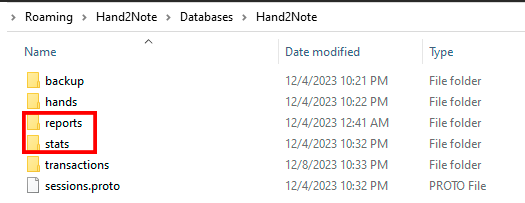
Then launch Hand2Note and click on Build Statistics:

If it doesn't help, you'll have to delete the entire database, unfortunately. But you will be able to restore your played hands by importing the following folders C:\Hand2Note4Hh\ and C:\MyHandsArchive_H2N4\ to new database.

Reply...
