H2N4 I can not open ...Critical Error ..Unfortunately, H2N has to shut down..
Hey guys,
I've tried to reinstall few times, but this Critical Errol stuff still jumps up.
I would appreciate it if you could help to fix it.
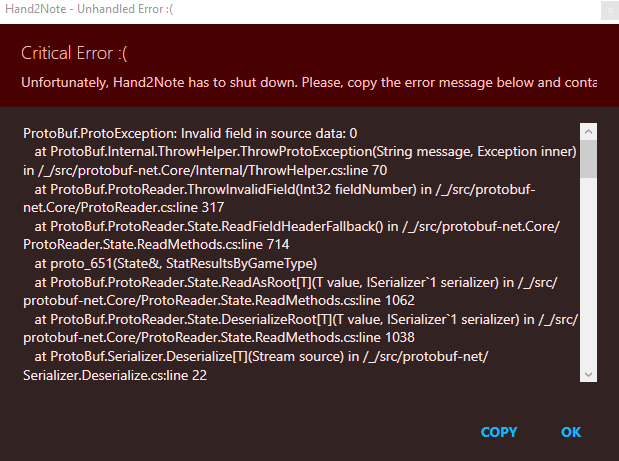
The whole text is:
ProtoBuf.ProtoException: Invalid field in source data: 0
at ProtoBuf.Internal.ThrowHelper.ThrowProtoException(String message, Exception inner) in /_/src/protobuf-net.Core/Internal/ThrowHelper.cs:line 70
at ProtoBuf.ProtoReader.ThrowInvalidField(Int32 fieldNumber) in /_/src/protobuf-net.Core/ProtoReader.cs:line 317
at ProtoBuf.ProtoReader.State.ReadFieldHeaderFallback() in /_/src/protobuf-net.Core/ProtoReader.State.ReadMethods.cs:line 714
at proto_651(State&, StatResultsByGameType)
at ProtoBuf.ProtoReader.State.ReadAsRoot[T](T value, ISerializer`1 serializer) in /_/src/protobuf-net.Core/ProtoReader.State.ReadMethods.cs:line 1062
at ProtoBuf.ProtoReader.State.DeserializeRoot[T](T value, ISerializer`1 serializer) in /_/src/protobuf-net.Core/ProtoReader.State.ReadMethods.cs:line 1038
at ProtoBuf.Serializer.Deserialize[T](Stream source) in /_/src/protobuf-net/Serializer.Deserialize.cs:line 22
at Hand2NoteCore.ChunksHelper.LoadChunk[T](PagedObjectPlacement pagedObjectPlacement, Chunks`1 chunks)
at Hand2NoteCore.ChunksHelper.TryLoad[T](Chunks`1 chunks, Int64 itemId, T& result)
at Hand2NoteCore.StatsDatabaseHelper.LoadStatsResults(StatisticsDatabase database, Int32 playerId)
at Hand2NoteCore.DatabaseHelper.GetStatResultsByGameType(Int32 playerDatabaseId, Database database)
at Hand2NoteCore.DatabaseHelper.GetStatResultsByGameType(PlayerId& playerId, Database database)
at Hand2NoteCore.DatabaseHelper.GetStatResultsForGameType(PlayerId playerId, Int32 gameTypeProfileId, Database database)
at Hand2NoteCore.PlayerPopupHelper.<>c__DisplayClass30_0.
at System.Linq.Enumerable.SelectIListIterator`2.ToList()
at Hand2NoteCore.Huds.ComputedHudHelper.GetStatResultById(IEnumerable`1 statResultById, UInt16 maxStatShortId)
at Hand2NoteCore.PlayerPopupHelper.GetStatResultById(IPlayerOrAlias playerId, PopupContext context, Int32 gameTypeProfileId)
at Hand2NoteCore.Reports.PlayerStatisticsHelper.GetInitialStatisticsReport(App app, IPlayerOrAlias playerOrAlias, GameTypeProfile gameTypeProfile, StatProfile statProfile, DateFilter dateFilter)
at Hand2NoteCore.Reports.PlayerStatisticsHelper.TryGetInitialStatisticsReportFromLastOpenedConfig(App app, LastOpenedStatisticsReport lastOpenedReport, StatisticsReport& result)
at Hand2NoteCore.Reports.PlayerStatisticsHelper.GetInitialStatisticsReport(App app)
at Hand2NoteCore.AppHelper.LoadInitialReports(App app)
at Hand2NoteCore.AppHelper.LoadApplication(AppLoader loader, ILogger logger, IHudIpcChannel hudIpcChannel, ITableWindowsProvider tableWindowsProvider, AppClipboard clipboard, IServiceProvider serviceProvider, AppLoadingObserver observer, Version applicationVersion)
at Hand2NoteApp.Windows.Program.Start(String[] args)
at Hand2NoteApp.Windows.Program.<>c__DisplayClass0_0.
at System.Windows.Application.<.ctor>b__1_0(Object unused)
at System.Windows.Threading.ExceptionWrapper.InternalRealCall(Delegate callback, Object args, Int32 numArgs)
at System.Windows.Threading.ExceptionWrapper.TryCatchWhen(Object source, Delegate callback, Object args, Int32 numArgs, Delegate catchHandler)
at System.Windows.Threading.DispatcherOperation.InvokeImpl()
at MS.Internal.CulturePreservingExecutionContext.CallbackWrapper(Object obj)
at System.Threading.ExecutionContext.RunInternal(ExecutionContext executionContext, ContextCallback callback, Object state)
--- End of stack trace from previous location ---
at System.Threading.ExecutionContext.RunInternal(ExecutionContext executionContext, ContextCallback callback, Object state)
at MS.Internal.CulturePreservingExecutionContext.Run(CulturePreservingExecutionContext executionContext, ContextCallback callback, Object state)
at System.Windows.Threading.DispatcherOperation.Invoke()
at System.Windows.Threading.Dispatcher.ProcessQueue()
at System.Windows.Threading.Dispatcher.WndProcHook(IntPtr hwnd, Int32 msg, IntPtr wParam, IntPtr lParam, Boolean& handled)
at MS.Win32.HwndWrapper.WndProc(IntPtr hwnd, Int32 msg, IntPtr wParam, IntPtr lParam, Boolean& handled)
at MS.Win32.HwndSubclass.DispatcherCallbackOperation(Object o)
at System.Windows.Threading.ExceptionWrapper.InternalRealCall(Delegate callback, Object args, Int32 numArgs)
at System.Windows.Threading.ExceptionWrapper.TryCatchWhen(Object source, Delegate callback, Object args, Int32 numArgs, Delegate catchHandler)
at System.Windows.Threading.Dispatcher.LegacyInvokeImpl(DispatcherPriority priority, TimeSpan timeout, Delegate method, Object args, Int32 numArgs)
at MS.Win32.HwndSubclass.SubclassWndProc(IntPtr hwnd, Int32 msg, IntPtr wParam, IntPtr lParam)
at MS.Win32.UnsafeNativeMethods.DispatchMessage(MSG& msg)
at System.Windows.Threading.Dispatcher.PushFrameImpl(DispatcherFrame frame)
at System.Windows.Application.RunDispatcher(Object ignore)
at System.Windows.Application.RunInternal(Window window)
at Hand2NoteApp.Windows.Program.Main(String[] args)
2 Replies
Hello,
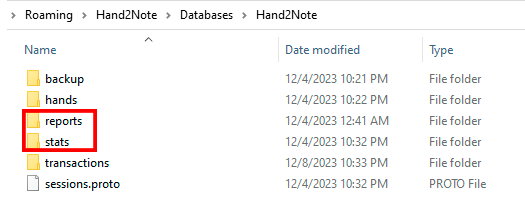
Could you try to delete these folders ("reports" and "stats") from the folder where your database is stored, by default here C:\Users\AppData\Roaming\Hand2Note\Databases:
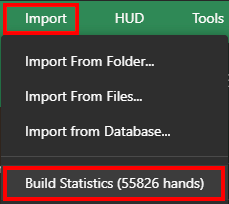
Then launch Hand2Note and click on Build Statistics:
If it doesn't help, you'll have to delete the entire database, unfortunately.
Thank you for your quick response!
So.. The database has been deleted, but saved to a pendrive...
I've reinstalled H2N4 , the database has been imported back.
Finally it works! 😀
I am grateful for your help!

